Apache Kafka: Powering Real-Time Data Streams
- Rakesh kumar
- Nov 11, 2024
- 5 min read

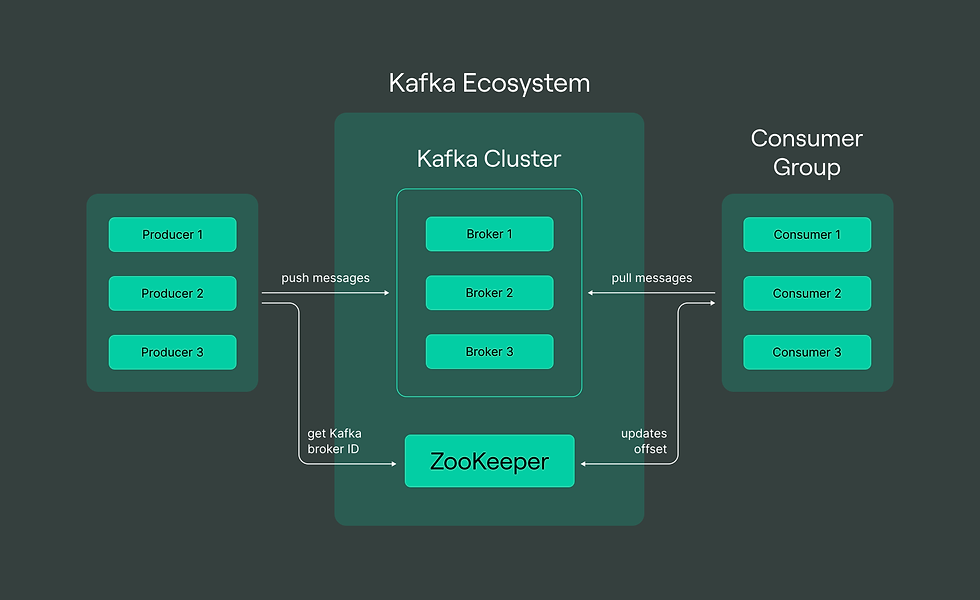
In the era of big data and real-time analytics, businesses need efficient ways to process, manage, and analyze vast amounts of data as it’s created. Apache Kafka has emerged as a powerful tool to enable just that, allowing organizations to build robust data pipelines and manage event streams effectively. This blog will take you through what Kafka is, how it works, and why it’s so popular for handling real-time data streams.
What is Apache Kafka?
Apache Kafka is an open-source, distributed event streaming platform developed by LinkedIn and later donated to the Apache Software Foundation. Originally designed as a high-throughput messaging system, Kafka has evolved into a comprehensive platform for data integration and processing in real time.
Kafka is built around the concept of *event streaming*, meaning that it captures, stores, and processes data as continuous streams of events. An event can be anything that happens, such as a new log entry, a user’s interaction on a website, or an IoT sensor update. Kafka makes it easy to consume, process, and reprocess these streams as they happen.
### Key Components of Kafka
To understand Kafka, it’s important to get familiar with its core components:
1. **Producer**:
- Producers publish data to Kafka topics, which are categories or feeds of data. A producer might be a web server, a mobile application, or any other entity that generates data to be processed.
2. **Consumer**:
- Consumers subscribe to topics and read data from Kafka, processing it as required. For instance, a consumer could be a data analytics service that processes clickstream data in real time.
3. **Topics**:
- Topics are where Kafka organizes events. Each topic can have multiple producers and consumers, and Kafka supports both publish-subscribe and queue-based models to ensure flexibility.
4. **Brokers**:
- Kafka runs on a cluster of servers known as brokers. These brokers work together to distribute data and manage requests, enabling Kafka to scale out and handle large volumes of data.
5. **Zookeeper**:
- Zookeeper is used to coordinate and manage Kafka brokers. However, recent versions of Kafka have introduced *KRaft* mode, a new way of managing Kafka clusters without requiring Zookeeper.
6. **Partitions**:
- Each topic in Kafka is split into multiple partitions. This allows Kafka to handle massive amounts of data by distributing the load across multiple servers. Partitions enable parallel processing, making Kafka extremely fast and resilient.
---
How Does Kafka Work?
Kafka works by storing data as a log in topics, which are divided into partitions. This partitioning allows Kafka to store and process data in parallel, making it efficient and highly scalable. Here’s a breakdown of how Kafka operates:
1. **Publishing Events**:
- Producers send data (events) to Kafka topics. Events can contain various kinds of information, such as metadata, key-value pairs, or any other relevant data. Kafka stores these events in a durable, immutable log.
2. **Event Retention**:
- Kafka retains data for a configurable amount of time, even after consumers have processed it. This allows consumers to reprocess or analyze past data if needed.
3. **Event Consumption**:
- Consumers subscribe to topics and read the event data at their own pace. They maintain their own offsets, or pointers, to know where they last read in a partition. Kafka does not delete data immediately after a consumer has processed it, allowing multiple consumers to read from the same topic independently.
4. **Scaling Through Partitions**:
- Partitions enable Kafka to balance the load by dividing data across multiple brokers in the cluster. This makes Kafka highly scalable, as each partition can be handled by different consumers in parallel.
- Kafka powers many real-time analytics applications, from monitoring customer behavior on websites to analyzing IoT sensor data.
2. **Log Aggregation**:
- Many companies use Kafka to collect and manage log data from multiple sources, centralizing it in a single place for analysis.
3. **Data Integration**:
- Kafka is often used as a backbone for connecting various data systems. Its stream processing capabilities allow it to act as a real-time data pipeline between databases, caches, and other data storage systems.
4. **Event Sourcing**:
- Kafka can act as an event store in applications built on event sourcing principles, enabling a sequence of events to be replayed, audited, or stored for compliance.
Kafka's Benefits and Drawbacks
Benefits
1. **Scalability**:
- Kafka’s partitioning and distributed nature enable it to handle large amounts of data by scaling horizontally.
2. **High Performance**:
- Kafka processes data in real time and can handle millions of events per second, thanks to its low-latency message handling.
3. **Fault Tolerance**:
- Kafka is built to be highly fault-tolerant. Data is replicated across brokers, and if a broker fails, another one can take over.
4. **Durability**:
- Kafka stores data persistently, making it suitable for critical applications where data cannot be lost.
Drawbacks
1. **Complexity**:
- Kafka has a steep learning curve and requires careful setup and management.
2. **Operational Overhead**:
- Operating a Kafka cluster can be resource-intensive, especially for large-scale deployments.
3. **Zookeeper Dependency** (pre-KRaft mode):
- Older Kafka versions rely on Zookeeper for managing clusters, which adds additional complexity and overhead. However, with newer versions, this dependency is being phased out.
Getting Started with Kafka
Commands
Start Zookeper Container and expose PORT 2181.
docker run -p 2181:2181 zookeeper
Start Kafka Container, expose PORT 9092 and setup ENV variables.
docker run -p 9092:9092 \
-e KAFKA_ZOOKEEPER_CONNECT=<PRIVATE_IP>:2181 \
-e KAFKA_ADVERTISED_LISTENERS=PLAINTEXT://<PRIVATE_IP>:9092 \
-e KAFKA_OFFSETS_TOPIC_REPLICATION_FACTOR=1 \
confluentinc/cp-kafka
CODE
client.js

const { Kafka } = require("kafkajs");

exports.kafka = new Kafka({
  clientId: "my-app",
  brokers: ["<PRIVATE_IP>:9092"],
});
admin.js
const { kafka } = require("./client");
async function init() {
const admin = kafka.admin();
console.log("Admin connecting...");
admin.connect();
console.log("Adming Connection Success...");
console.log("Creating Topic [rider-updates]");
await admin.createTopics({
topics: [
{
topic: "rider-updates",
numPartitions: 2,
},
],
});
console.log("Topic Created Success [rider-updates]");
console.log("Disconnecting Admin..");
await admin.disconnect();
}
init();producer.js
const { kafka } = require("./client");
const readline = require("readline");
const rl = readline.createInterface({
input: process.stdin,
output: process.stdout,
});
async function init() {
const producer = kafka.producer();
console.log("Connecting Producer");
await producer.connect();
console.log("Producer Connected Successfully");
rl.setPrompt("> ");
rl.prompt();
rl.on("line", async function (line) {
const [riderName, location] = line.split(" ");
await producer.send({
topic: "rider-updates",
messages: [
{
partition: location.toLowerCase() === "north" ? 0 : 1,
key: "location-update",
value: JSON.stringify({ name: riderName, location }),
},
],
});
}).on("close", async () => {
await producer.disconnect();
});
}
init();consumer.js
const { kafka } = require("./client");
const group = process.argv[2];
async function init() {
const consumer = kafka.consumer({ groupId: group });
await consumer.connect();
await consumer.subscribe({ topics: ["rider-updates"], fromBeginning: true });
await consumer.run({
eachMessage: async ({ topic, partition, message, heartbeat, pause }) => {
console.log(
`${group}: [${topic}]: PART:${partition}:`,
message.value.toString()
);
},
});
}
init();Wrapping Up
Apache Kafka is an incredible tool for building real-time data pipelines and streaming applications. It’s built for high performance, scalability, and fault tolerance, which is why it’s so widely used by companies that need to process massive amounts of data in real time.
While Kafka does come with some complexities, its benefits in enabling powerful, flexible, and scalable data streaming systems make it a popular choice for organizations of all sizes. Whether you’re looking to implement real-time analytics, log aggregation, or event sourcing, Kafka provides a strong backbone for your data infrastructure.


Comments